For teachers, homeschool parents & club leaders
Teach how AI works, with nothing to set up.
Seven free, hands-on lessons for ages 6–10. Kids teach a tiny AI named Pip, watch it guess, and fix it when it’s wrong. Start with the free print-and-go kit for Lesson 1.
This page is for grown-ups. Kids can head to the lesson trail.
Lesson 1 teacher kit: Meet Pip: What is AI?
Everything you need to teach Lesson 1 in about 35 minutes, ready to print. No email and no sign-up. Just download it.
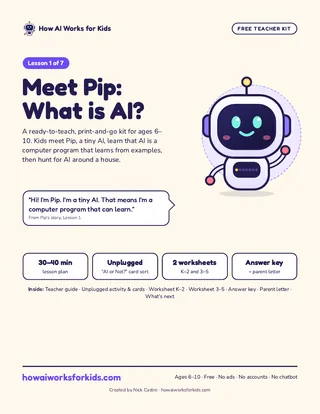
- Cover
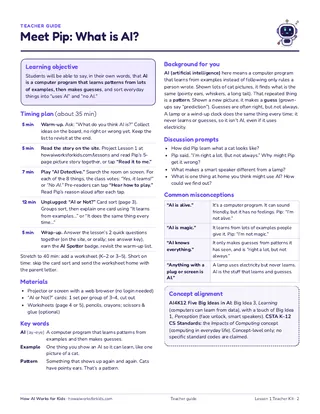
- 35-min teacher guide
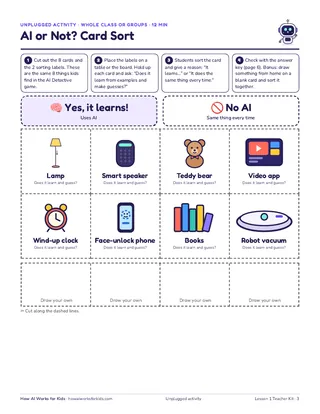
- AI or Not? card sort
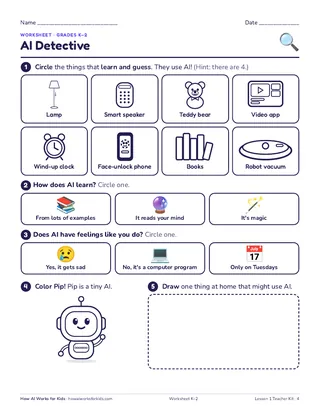
- K–2 worksheet
What’s inside
- 35-minute teacher guideA minute-by-minute plan, background for you, key words, discussion prompts, and common misconceptions.
- “AI or Not?” card sortAn unplugged activity with 8 cut-out cards and 2 sorting labels, for the whole class or small groups.
- K–2 worksheetCircle the things that learn and guess. Light on reading, heavy on pictures.
- 3–5 worksheetSort the 8 things and explain your thinking in a sentence.
- Answer keyEvery card and question, with Pip’s own reasons from the game.
- Parent letterA take-home note that tells families what their child learned and how to keep the talk going.
How to use the site in class
Projector or 1:1 devices
Project a lesson and let the class vote on every move, or have students play on their own tablets or Chromebooks. Everything works with touch, a mouse, or a keyboard.
About 30–40 minutes
Each lesson on the site takes 5–6 minutes. Add a warm-up, discussion, and the unplugged activity and you have a 30–40 minute class.
Read-aloud for pre-readers
Every story, game instruction, question, and answer choice has a speaker button. Tap “Hear how to play” at the start of any game. Answers have pictures too.
No accounts needed
No logins, no student data, no ads, and no open AI chat. Students can’t type to an AI. Every answer in the games is written in advance.
Progress stays on the device
Finished lessons are saved in that browser only and never sent anywhere. On shared devices, tap “Start over” on the lesson trail to reset it for the next student.
The Full Teacher Pack
The same print-and-go format for all 7 lessons: a teacher guide, an unplugged activity, K–2 and 3–5 worksheets, an answer key, and a parent letter for each one. Nothing to sign up for. Check back here.
- Free kit now
Lesson 1: Meet Pip: What is AI?
- Coming soon
Lesson 2: Teach by Showing
- Coming soon
Lesson 3: How Chatbots Talk
- Coming soon
Lesson 4: Good Examples In, Good Guesses Out
- Coming soon
Lesson 5: Sure Doesn't Mean Right
- Coming soon
Lesson 6: Real or Made by AI?
- Coming soon
Lesson 7: Be the Boss of AI
Standards connections
The lessons connect, at the concept level, to the AI4K12 Five Big Ideas in AI and the Impacts of Computing concept in the CSTA K–12 Computer Science Standards. We describe concepts only and don’t claim specific standard codes.
AI4K12 Big Idea 1
Perception
Computers sense the world with sensors, like a phone that sees a face or a speaker that hears words.
Lessons1
AI4K12 Big Idea 2
Representation & Reasoning
AI keeps track of features (color, shape) and uses them to decide.
AI4K12 Big Idea 3
Learning
Computers can learn from data. Students give Pip examples, watch it guess, and fix it.
AI4K12 Big Idea 4
Natural Interaction
Chatbots guess the next word. They can sound sure and still be wrong.
AI4K12 Big Idea 5
Societal Impact
Lopsided data, made-up answers, AI-made pictures, and staying safe and private.
Ready for Lesson 1?
Download the kit, then project the lesson. No setup, no logins.